Note · 2026-11-09
Local speech-to-text with faster-whisper
faster-whisper runs Whisper models on hardware you control. Decide local vs cloud STT, what fails in practice, and when a human pass remains required.
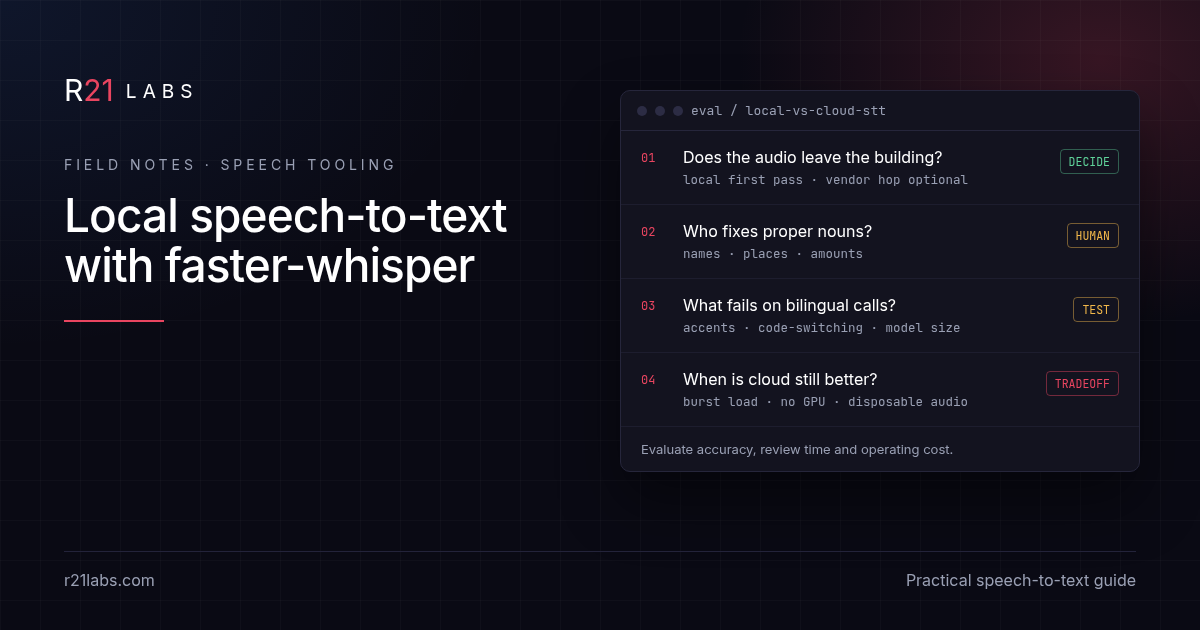
Short answer: faster-whisper is a public product for running Whisper-family models on hardware you control. This note is about how to decide and what breaks, not about restating install, licence, or list-price math. Those live on the faster-whisper tool page.
Talk to us about a build · +1 224-256-7011
Last updated: November 9, 2026.
What this note covers (and what it does not)
The catalog card already answers "what is it," "how do I install it," and "what does a cloud minute cost on published pricing." If you need those facts, open the tools page and the upstream SYSTRAN/faster-whisper README.
Here we stay on decisions:
- When local first-pass transcription is worth the ops cost
- Failure modes that show up after the demo clip works
- A practical evaluation checklist before you wire it into a workflow
- When cloud STT is still the better tradeoff
- FAQ that teams actually ask after the first week
Decision 1: does the audio need to stay put?
Start with the artifact, not the model name. If the recording contains client names, contract terms, or other material you would not paste into a public chat, ask whether the first transcription pass must leave your network. Local STT is one way to keep that first pass inside a machine you control. It is not a substitute for access control, retention rules, or a lawyer.
Write the decision as a one-liner you can defend:
- "First pass local; cloud only if a human exports a redacted clip."
- Or: "Cloud is fine; audio is disposable training for our own prompts and holds no client identifiers."
If you cannot write either sentence without hedging, pause. The tooling choice is secondary to the data class.
Decision 2: who owns the proper-noun pass?
Transcripts fail first on names, places, and amounts. A model can spell the same person three ways in one meeting, and each spelling can look plausible enough to copy into a CRM. Before you celebrate word-error-rate on a clean podcast file, assign an owner for the human pass:
- Who checks speaker names against the calendar invite?
- Who confirms dollar amounts against the slide deck?
- Who catches code-switched place names on bilingual calls?
If nobody owns that pass, local vs cloud does not matter. You will still publish confident wrong strings.
Decision 3: what breaks on bilingual and accented speech?
Agency audio in Puerto Rico is rarely a clean monoculture studio take. You get English with Spanish nouns, Spanish with English product names, and accents the demo reel never showed. Model size is a quality dial here more than a vanity metric. Smaller models are cheaper to run and worse exactly where your content is densest: proper nouns and mixed-language turns.
Evaluation tip: build a ten-minute internal fixture from real (consented) calls you already store, not from a TED talk. Score:
- Person names
- Company names
- Municipalities and neighborhood names
- Dollar figures and dates
- English product names inside Spanish sentences (and the reverse)
Promote a model size only when that fixture improves, not when a blog benchmark looks impressive.
Decision 4: when is cloud still better?
Local is not automatically virtuous. Cloud STT wins when:
- Audio is disposable and already cleared for a vendor path
- You have burst load (hundreds of hours in a week) and no capacity plan
- You need features the local stack does not give you yet (diarization product A, language ID product B) and you accept the hop
- Your operators cannot keep a runtime healthy (drivers, disk, queue depth)
Write the tradeoff out loud. "We picked cloud because the audio class is low sensitivity and we need burst capacity" is a valid architecture sentence. Pretending every file must stay local when it does not is how projects stall.
An evaluation checklist you can run in one afternoon
Use this as a gate before any production wiring. Keep notes next to the version you tested.
- Data class. Sensitive client audio, or disposable internal scratch? Document it.
- Fixture set. Ten minutes of representative audio with a gold transcript for names and amounts.
- Runtime ownership. Who restarts the worker, watches disk, and pins versions?
- Output contract. Plain text, timed segments, or speaker labels? Reject silent format drift.
- Human pass. Named role, not "someone will glance."
- Failure queue. What happens when confidence is low or the file is noisy? Drop, retry, or escalate?
- Export rules. When may a clip leave the building after the local pass?
- Licence and version pin. Check the tag you run; do not trust a README badge alone. Pattern notes: licence-check before listing.
- Secret hygiene. API keys and cloud fallbacks stay out of prompts and logs. Related: when not to put API keys in prompts.
- Rollback. How do you unpin a bad model upgrade in under an hour?
If any row is blank, you are still in demo land.
Failure modes beyond "it misspelled a name"
Teams that clear the name problem still trip on:
- Silence and overlap. Crosstalk collapses segments; timestamps look fine and meaning does not.
- Domain jargon. Drug names, legal captions, SKU codes. Fixtures must include them.
- Compression artifacts. Phone audio through a meeting bot is not the same as a WAV from a recorder.
- Auto-punctuation lies. A confident period can split a negation from its verb.
- Language ID thrash. Mixed turns flip mid-sentence; downstream translation then amplifies the error.
- Operator drift. Someone "helpfully" upgrades the model on Friday; Monday's CRM imports break.
For each failure, decide whether the fix is model size, audio preprocessing, a human gate, or "do not automate this file class."
Where related details live
| Question | Where it lives |
|---|---|
| Install, licence label, cloud list-price cite | Tools page |
| Decision criteria, fixtures, failure modes, FAQ below | This note |
| Secrets in prompts | Keys note |
| Licence first-pass pattern | Licence-check note |
Install steps and list pricing stay on the tools page so this note can stay on decisions and troubleshooting.
FAQ
Is faster-whisper the same as the OpenAI Whisper API? No. One is a local runtime for Whisper-family models. The other is a hosted endpoint with its own data path and pricing. Details and cites: tools page.
Does local transcription make us compliant? No. It can remove one disclosure hop for a first pass. Retention, access, and contracts remain yours.
How long should the human pass take? Budget against your fixture: count proper-noun fixes per ten minutes of audio, then multiply. If the pass costs more than the meeting, narrow what you automate.
Can we skip fixtures and trust vendor demos? You can. You will rediscover bilingual and jargon failures in production. Fixtures are cheaper.
Will this improve search rankings? No. This is a tooling note. It makes no ranking, citation, or lead claims.
Where do install and pricing live? On the faster-whisper tool page and upstream docs, so this note stays unique.
Want help designing the evaluation, not just the install?
R21 Labs helps agencies choose and wire tools with the decision written down, not only the package name. Talk to us about a build or call +1 224-256-7011. Related: keeping secrets out of the prompt with MCP connectors.