Note · 2026-11-16
Browser QA with Playwright on client sites
A post-deploy Playwright pass for client sites: what to script first, what a glance misses, and how to keep those checks small enough to keep running.
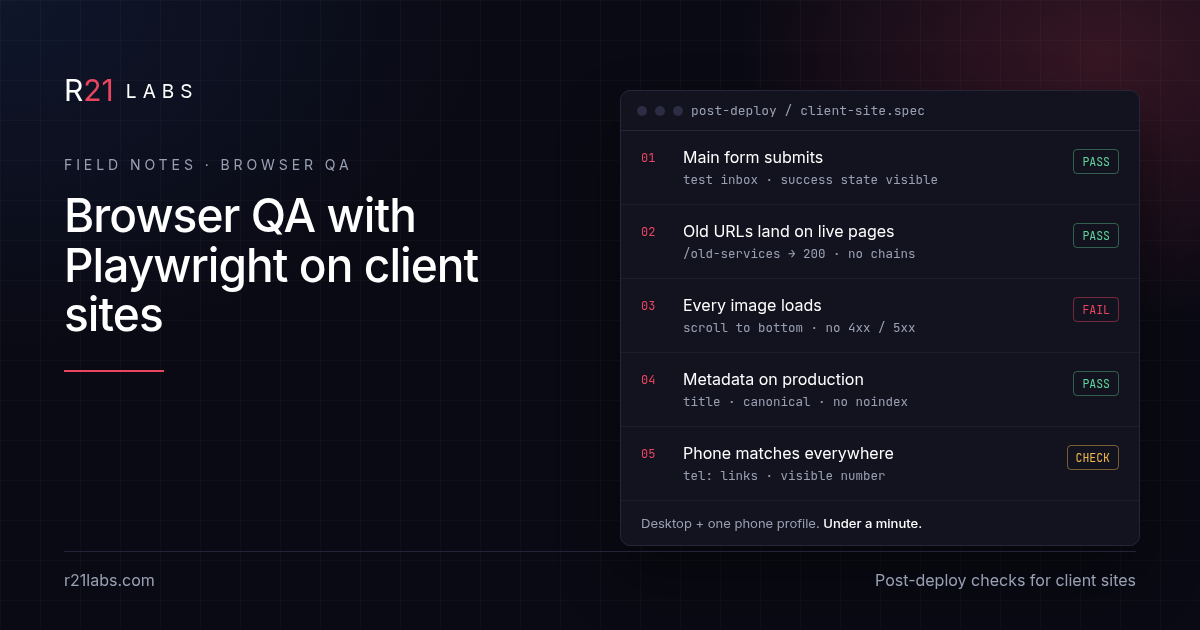
Short answer: after every deploy to a client site, run a short scripted pass in a real browser that submits the main form, follows the old URLs, loads every image on the key pages and reads the page metadata. Playwright does that well. Install steps, licence and the two ways to drive a browser live on the Playwright tool page. This note is about what to check and how to keep the pass small enough that it survives.
Talk to us about a build · +1 480-997-4639
Last updated: November 16, 2026.
Why a glance is not QA
The usual post-deploy check is opening the homepage and scrolling. It catches the things that were never likely to break: the header, the hero, the colors. What breaks on a client site after a deploy usually sits one step away from the homepage:
- A contact form that posts to a route that was renamed
- A redirect that drops the form body or loops between
wwwand the bare domain - An image below the fold that returns 404
- A page that quietly picked up
noindexfrom a staging setting - A phone link that still points at last year's number
None of those show up in a screenshot of the first screen. All of them show up in a script that does what a visitor does.
What to script first
Start with five checks. Each one maps to a way a client loses a lead or a search listing, which is what they will actually call about.
- The money form. Fill and submit the main contact or booking form with a test payload, then assert the success state. If the form sends real email, point it at a test inbox or a staging endpoint so the client never gets a fake lead.
- Old URLs. Keep a short list of URLs that used to exist: the old blog paths, the previous services page, the URL printed on the business card. Request each one and assert it lands on a live page with a 200, not a 404 or a redirect chain.
- Images on key pages. Listen for responses while the page loads and fail the run on any image that returns 4xx or 5xx. Scroll to the bottom first so lazy-loaded images actually request.
- Metadata. Read the title, the meta description, the canonical link and the robots meta tag on the homepage and one service page. A
noindexon production is a failure, not a warning. - Contact details. Assert that the
tel:links and the visible phone number match the number the client gave you, on every page that has one.
That is the whole first version. It runs in well under a minute on a typical brochure site, which matters for the next section.
Keep the pass small enough to survive
Browser test suites die the same way: someone writes sixty tests in the first week, three of them are flaky, the team learns to ignore red, and the suite stops meaning anything. A post-deploy pass for a small client site should be boring and fast.
- One file per site. The checks above fit in one spec. If a second file appears, ask whether it is QA or a feature test that belongs somewhere else.
- Assert outcomes, not layout. "The success message is visible" survives a redesign. "The button is 48 pixels from the footer" does not.
- Use roles and labels to find elements. Locating by role and accessible name (for example the button named "Send") breaks less often than CSS classes, and it doubles as a light accessibility check.
- Retry nothing by default. If a check needs a retry to pass, it is telling you something about the site or the test. Fix one of them.
- Run it on the production URL right after the deploy finishes, not only on a preview. Preview builds often differ in environment settings, which is exactly where
noindexand wrong form endpoints hide.
Mobile is a separate run, not a resize
Most client-site traffic is on phones, and the problems are different there: a sticky header that covers the form's submit button, a menu that never opens, a click-to-call link that only exists in the desktop footer. Playwright ships device descriptors that set viewport, user agent and touch together. Run the same five checks under one phone profile as a second project in the config. You do not need ten devices. You need one that behaves like the phone most of the client's visitors use.
When a check fails
A red run after a deploy needs an owner and a next step, or it becomes noise.
- Form failed: treat it as a lead outage. Roll back or fix before anything else, and tell the client only after you know whether real leads were lost in the window.
- Old URL 404: add the redirect. Note the path in the list so the next deploy checks it too.
- Image 404: usually a renamed file or a case-sensitive path that worked on one host and not another.
- Metadata wrong: check the environment variables for the production build before touching templates.
- Phone mismatch: fix it everywhere at once. A site with two numbers trains visitors to distrust both.
Playwright's trace viewer records each step with network and DOM snapshots, which turns "it failed on the server" into a specific request you can look at. Turn traces on for failed runs only, so storage stays small.
What this pass does not replace
A scripted pass checks that the site still does what it did yesterday. It does not tell you whether the copy is right, whether the client approved the new section, or whether the page reads well on a slow connection. Keep a human review for content and a separate performance check for speed. The browser pass is the floor, not the ceiling.
Where related details live
| Question | Where it lives |
|---|---|
| Install, licence, launched vs attached browser | Playwright tool page |
| What to check after a client deploy, failure handling | This note |
| Keeping credentials out of scripts and prompts | When not to put API keys in prompts |
| Checking a tool's licence before you rely on it | Licence-check note |
FAQ
Do I need a paid test runner for this? No. Playwright is open source under Apache-2.0 and runs locally or in any CI. Pricing comparisons sit on the tool page.
Will the form test send fake leads to my client? Only if you let it. Point the submission at a test inbox or a staging endpoint, or tag test submissions so the client's notifications filter them out.
How long should the pass take? For a typical small business site, under a minute per browser profile. If it takes longer, it is probably testing features, not checking the deploy.
Should the test log in to the client's admin? Avoid it for a post-deploy pass. Test what a visitor sees. If an admin check is truly needed, use a dedicated test account with the least access, and keep its password out of the script.
Does this improve search rankings?
No. It catches problems such as noindex or broken redirects that can hurt a site, but it makes no ranking or traffic claims.
What about visual regression screenshots? Useful later, once the five checks are stable. Screenshot diffs are noisy on sites with rotating content, so add them page by page.
Want help setting up a pass for your sites?
R21 Labs helps agencies set up checks they will keep running, not a suite that gets ignored. Talk to us about a build or call +1 480-997-4639.